
GitHub Copilot CLI Developer Cheatsheet
A complete breakdown of every command category — from basic shell commands to OpenTelemetry observability.

If you’ve been using Claude Code and thinking “this is neat” I want to also introduce you to GitHub Copilot CLI. With CLI you get an autonomous agent that can read your codebase, write code, run tests, open pull requests, and browse the web, all from your terminal. But like any powerful tool, it has a sprawling surface area. There are slash commands, lifecycle hooks, MCP servers, custom agents, permission patterns, and an OpenTelemetry integration and the official docs, while thorough, read like a reference manual rather than a guide.
This article walks through all 14 command categories in GitHub Copilot CLI in plain language, so you can actually understand what’s available and when to reach for it.
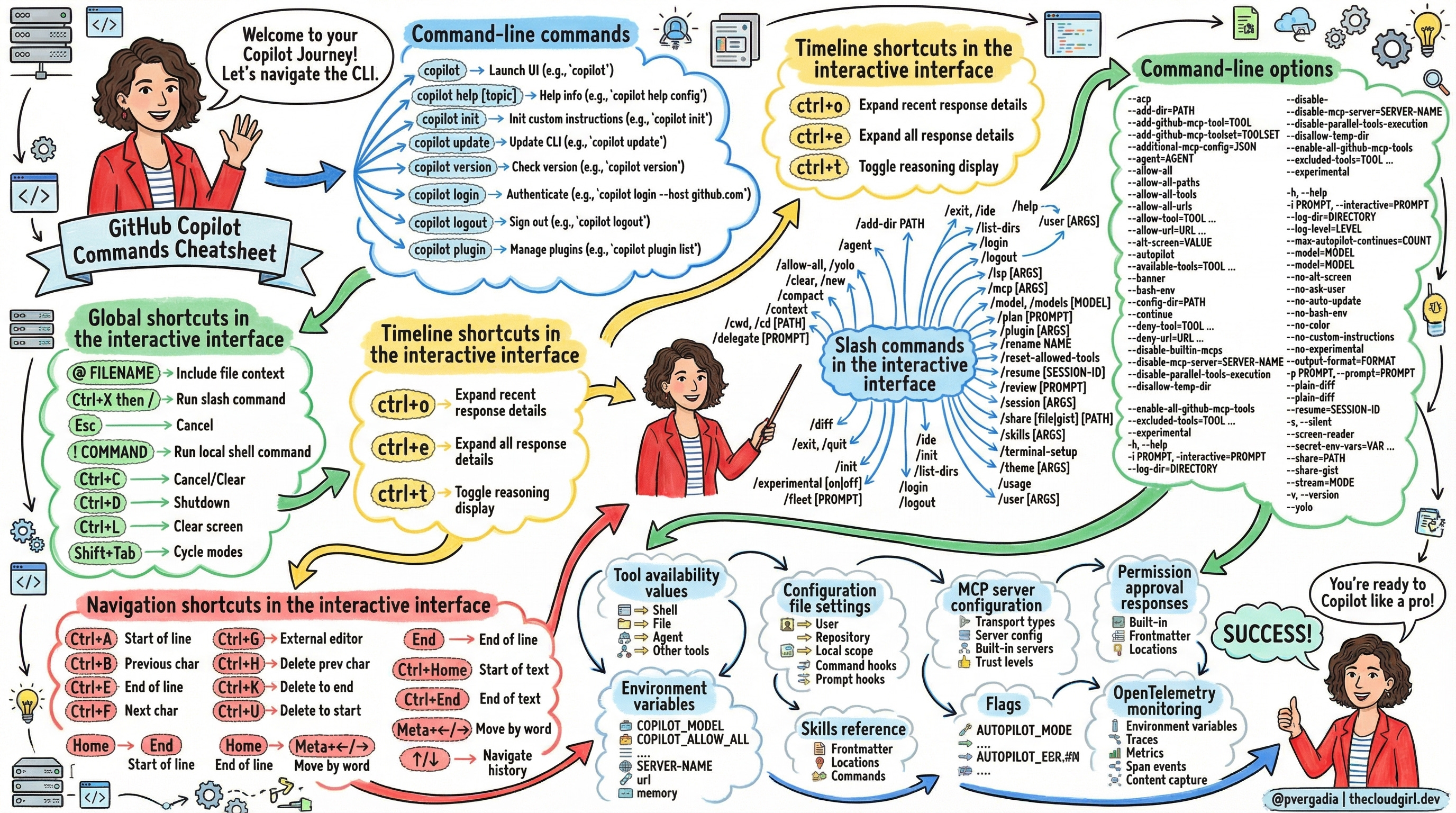
1. Command-Line Commands
The top-level shell commands you run to launch, configure, and authenticate Copilot CLI.
copilot— Launch the full interactive session.copilot init— BootstrapAGENTS.mdcustom instructions in the current repo.copilot login— Authenticate via OAuth device flow. Use--hostfor GitHub Enterprise.copilot logout— Sign out and remove stored credentials.copilot update— Download and install the latest version.copilot version— Show current version and check for updates.copilot plugin— Manage plugins and plugin marketplaces.copilot help [topic]— Topics:config,commands,environment,logging,permissions.
2. Global Shortcuts (Interactive UI)
Keyboard controls available anywhere in the interactive session.
Ctrl+C— Cancel or clear input. Press twice to exit.Ctrl+D— Graceful shutdown.Ctrl+L— Clear the screen.Shift+Tab— Cycle between standard, plan, and autopilot mode.Esc— Cancel the current operation.@ FILENAME— Inject file contents into context.! COMMAND— Run a shell command, bypassing Copilot.Ctrl+X then /— Insert a slash command mid-prompt without retyping.
3. Timeline & Navigation Shortcuts
Ctrl+O— Expand the most recent timeline item.Ctrl+E— Expand all timeline items.Ctrl+T— Toggle reasoning/thinking display.↑/↓— Navigate command history.Ctrl+G— Edit the current prompt in an external editor.Ctrl+K— Delete from cursor to end of line.Ctrl+W— Delete the previous word.Meta+←/→— Move cursor by word.
4. Slash Commands
In-session power commands. Type /help inside the CLI for the full list.
/plan— Create an implementation plan before writing code./delegate— Push changes to a remote repo with an AI-generated pull request./fleet— Spawn parallel subagents to run parts of a task simultaneously./review— Run the code review agent on current directory changes./mcp— Show, add, edit, delete, enable, or disable MCP server configs./model— Switch the AI model mid-conversation./context— Visualise context window token usage./compact— Summarise conversation history to free up context space./diff— Review all changes made in the current session./skills— List, add, remove, or reload skills./session— Inspect state, checkpoints, touched files, and active plan./share— Export the session to a Markdown file or GitHub gist.
5. Command-Line Options
Flags passed when launching copilot. These override all config files and environment variables.
-p / --prompt— Execute a one-shot prompt and exit. Ideal for scripting.-i / --interactive— Start interactive mode and auto-submit a first prompt.--autopilot— Continue executing without prompting for approval.--allow-all/--yolo— Grant every tool, path, and URL permission.--allow-tool / --deny-tool— Fine-grained tool whitelisting/blacklisting.--model— Override the AI model (e.g.claude-sonnet-4.6).--agent— Launch a specific custom agent instead of the default.--continue / --resume— Pick up a previous session.--output-format=json— Emit JSONL output, one object per line.--silent— Suppress usage stats; print only the agent response.--additional-mcp-config— Inject an MCP server config for this session only.--disable-builtin-mcps— Opt out of the bundled GitHub MCP, playwright, fetch, and time servers.
6. Tool Permission Patterns
Granular allow/deny rules using Kind(argument) syntax. Deny always beats allow, even with --allow-all.
shell(git:*)— Matches all git subcommands. The:*suffix prevents partial matches (e.g. won’t matchgitea).write(src/*.ts)— Restricts writes to TypeScript files insrc/. Omit argument to allow all writes.MyMCP(create_issue)— Allow one specific tool from a named MCP server.url(*.api.com)— Wildcard domain matching for web-fetch and shell URL access.memory— Allow or deny the agent from storing facts to persistent memory.
7. Environment Variables
Shell-level config that persists across sessions. Useful for CI and dotfiles.
COPILOT_GITHUB_TOKEN— Primary auth token; takes precedence overGH_TOKENandGITHUB_TOKEN.COPILOT_ALLOW_ALL— Set totrueto skip all permission prompts.COPILOT_MODEL— Override the default AI model for every session.COPILOT_HOME— Redirect config/state storage away from the default~/.copilot.COPILOT_SKILLS_DIRS— Comma-separated list of additional skill directories.COPILOT_AUTO_UPDATE— Set tofalseto prevent automatic update downloads.COPILOT_CUSTOM_INSTRUCTIONS_DIRS— Extra directories scanned forAGENTS.mdfiles.
8. Configuration File Settings
Three-tier cascade: user → repository → local. More specific scopes win. CLI flags beat everything.
User (
~/.copilot/config.json) — Global defaults for all repos. Controls model, theme, streaming, auto-update, trusted folders, and more.Repository (
.github/copilot/settings.json) — Committed to the repo. Supports company announcements, enabled plugins, and marketplace definitions.Local (
.github/copilot/settings.local.json) — Personal overrides. Add to.gitignore. Overrides repository config without polluting the shared file.
9. Hooks Reference
Lifecycle hooks that fire at specific agent events. Configured in .github/hooks/*.json. Two types: command (shell script) and prompt (session-start auto-submit).
sessionStart— Fires when a session begins. Supportsprompttype to auto-submit a message.userPromptSubmitted— Fires after the user submits a prompt. Good for logging.preToolUse— Fires before any tool executes. ReturnpermissionDecision: allow/deny/askormodifiedArgsto substitute tool arguments.postToolUse— Fires after a tool completes. Useful for side-effects and tracking.agentStop / subagentStop— Fires when an agent finishes a turn. Returndecision: "block"with areasonto force another agent turn — great for automated quality gates.sessionEnd / errorOccurred— For cleanup scripts or alert notifications.
10. MCP Server Configuration
MCP (Model Context Protocol) servers extend the CLI with external tools. Configured in ~/.copilot/mcp-config.json or injected per-session with --additional-mcp-config.
Built-in servers (no setup required):
github-mcp-server— Issues, PRs, commits, GitHub Actions, code search.playwright— Browser automation: navigate, click, screenshot.fetch— HTTP requests.time— Timezone and time conversion utilities.
Transport types: local/stdio (local process), http (streamable HTTP), sse (Server-Sent Events).
Trust levels: Built-in = high. Repository/workspace configs = medium, review recommended. Remote servers = low, always review.
11. Skills Reference
Markdown files (SKILL.md) that inject context and pre-allowed tool lists when invoked via /SKILL-NAME or automatically by the agent.
Key frontmatter fields:
name— Unique ID; becomes the/SKILL-NAMEslash command.description— What it does. The agent uses this to decide whether to auto-invoke.allowed-tools— Tools auto-permitted when this skill is active. Use"*"for all.user-invocable— Whether users can call it manually. Default:true.disable-model-invocation— Prevent the agent from auto-invoking it. Default:false.
Load priority order: .github/skills/ → .agents/skills/ → .claude/skills/ → parent skills → ~/.copilot/skills/ → plugin dirs → COPILOT_SKILLS_DIRS.
12. Custom Agents Reference
Specialised AI agents defined in .agent.md files. Each has its own model, tools, and MCP servers.
Built-in agents:
code-review(Sonnet 4.5) — Analyses diffs for bugs, security issues, and logic errors.explore(Haiku 4.5) — Fast codebase search and Q&A. Under 300 words. Safe to parallelize.general-purpose(Sonnet 4.5) — Full-capability agent for complex multi-step tasks, in its own context window.research(Sonnet 4.6) — Deep research combining codebase, GitHub repos, and web sources.task(Haiku 4.5) — Runs builds, tests, and linters. Terse on success, verbose on failure.
13. Permission Approval Responses
When Copilot prompts for permission at runtime, respond with these keys:
y— Allow this specific request once.n— Deny this specific request once.!— Allow all similar requests for the rest of this session.#— Deny all similar requests for the rest of this session.?— Show detailed information about what’s being requested.
Session-level approvals (! and #) reset when you run /clear or start a new session.
14. OpenTelemetry Monitoring
Export traces and metrics to any OTLP-compatible backend. Off by default with zero overhead. Follows OTel GenAI Semantic Conventions.
Activates when any of these are set: COPILOT_OTEL_ENABLED=true, OTEL_EXPORTER_OTLP_ENDPOINT, or COPILOT_OTEL_FILE_EXPORTER_PATH.
Key spans:
invoke_agent— Root span for a full agent turn. Captures total tokens, cost, AIU, and turn count.chat— One per LLM API call. Records model, token usage, cache hits, and server latency.execute_tool— One per tool invocation. Records tool name, call ID, and optionally I/O with content capture on.
Key metrics: gen_ai.client.token.usage (token histogram), github.copilot.tool.call.count (per-tool invocation counter), github.copilot.tool.call.duration (latency histogram).
⚠️ Setting
OTEL_INSTRUMENTATION_GENAI_CAPTURE_MESSAGE_CONTENT=trueexports full prompts and file contents. Only enable in trusted environments.
Wrapping Up
The Copilot CLI is genuinely more than a chat interface bolted onto a terminal. The combination of hooks, custom agents, MCP servers, and the permission model gives you something closer to a programmable AI teammate — one you can constrain, observe, and extend to fit your workflow.
The categories that tend to surprise developers the most are hooks (you can block or modify tool calls in real-time), the agent system (different built-in agents are tuned for very different tasks — don’t use general-purpose when explore or task will do the job faster and cheaper), and OpenTelemetry (if you’re running Copilot in a team or CI context, the token and cost metrics are invaluable for understanding what’s actually happening).
Start with the slash commands and shortcuts to get comfortable with the interactive UI, then layer in custom instructions and skills as your usage grows. The deeper features like hooks and MCP servers are worth exploring once you find yourself wishing the agent “just knew” certain things or “just had permission” to do certain things — that’s exactly what they’re designed for.
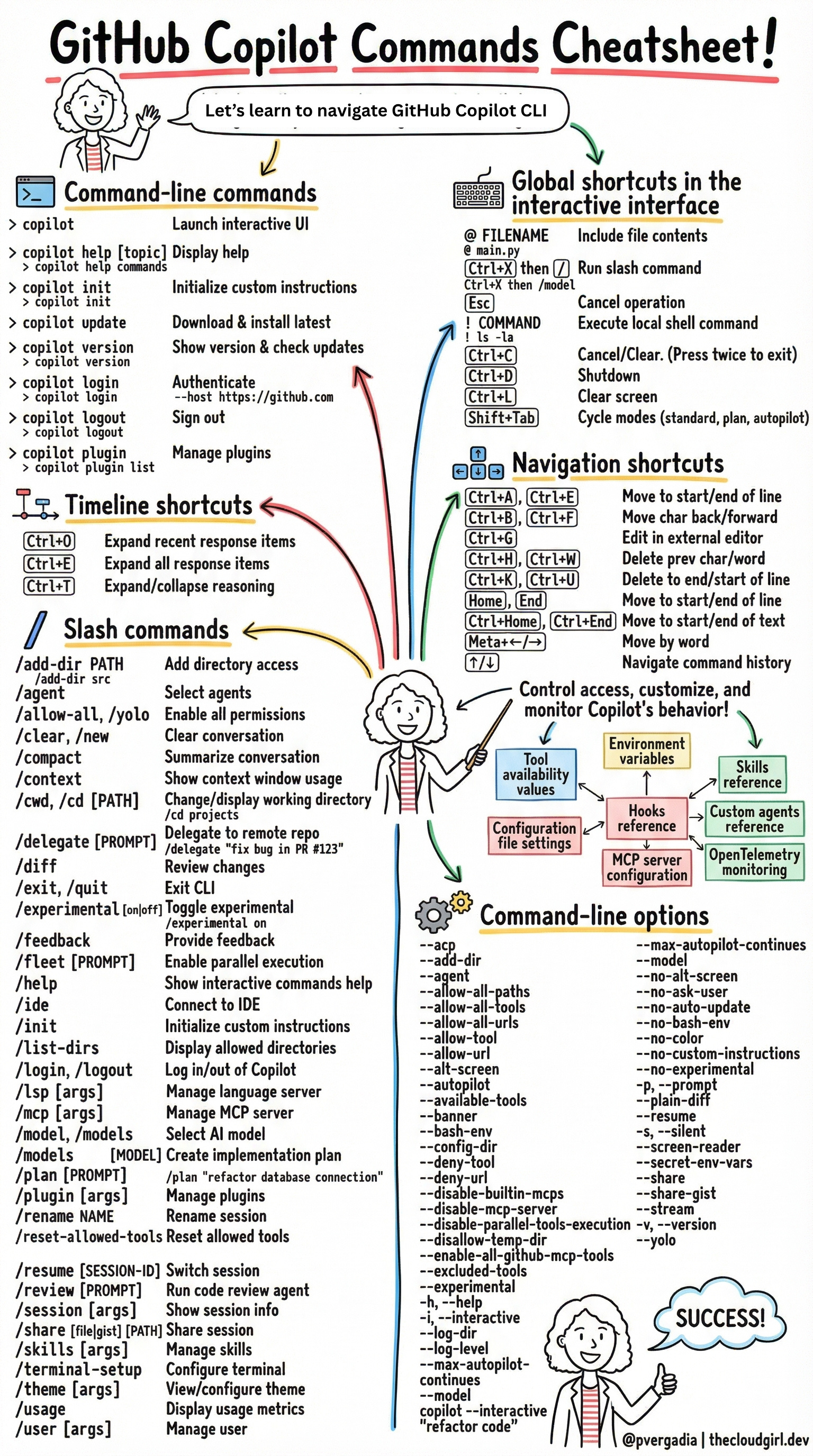
Based on the official GitHub Copilot CLI Command Reference