
GitHub Copilot Project Structure: The No-Fluff Cheatsheet for AI-Powered Dev Teams
What Product Leads, Architects, and Developers Each Need to Write — Before Copilot Writes Anything

I was staring at a Python function that Copilot had just “helpfully” suggested — one that bore no resemblance to our internal API conventions, ignored the database abstraction layer we’d spent weeks building, and confidently imported a library we’d deprecated six months ago. Copilot wasn’t broken. I was just asking it to navigate a dark room without a map.
That day, I started rethinking how I structured my projects. Not just for humans in my team but for AI, for Copilot to help me write better code, more useful code, that follows our company stack, guardrails and standards.
Copilot Doesn’t Know What It Doesn’t Know
GitHub Copilot is powerful. But without context, it’s essentially a brilliant new hire who’s never read the onboarding docs. It’ll write code that compiles, runs, and still makes your senior engineer wince. It doesn’t know your naming conventions, your architecture decisions, your preferred error-handling patterns, or why you chose SQLAlchemy over raw SQL three years ago.
The fix isn’t to give up on AI assistance. The fix is to give it a structured home.
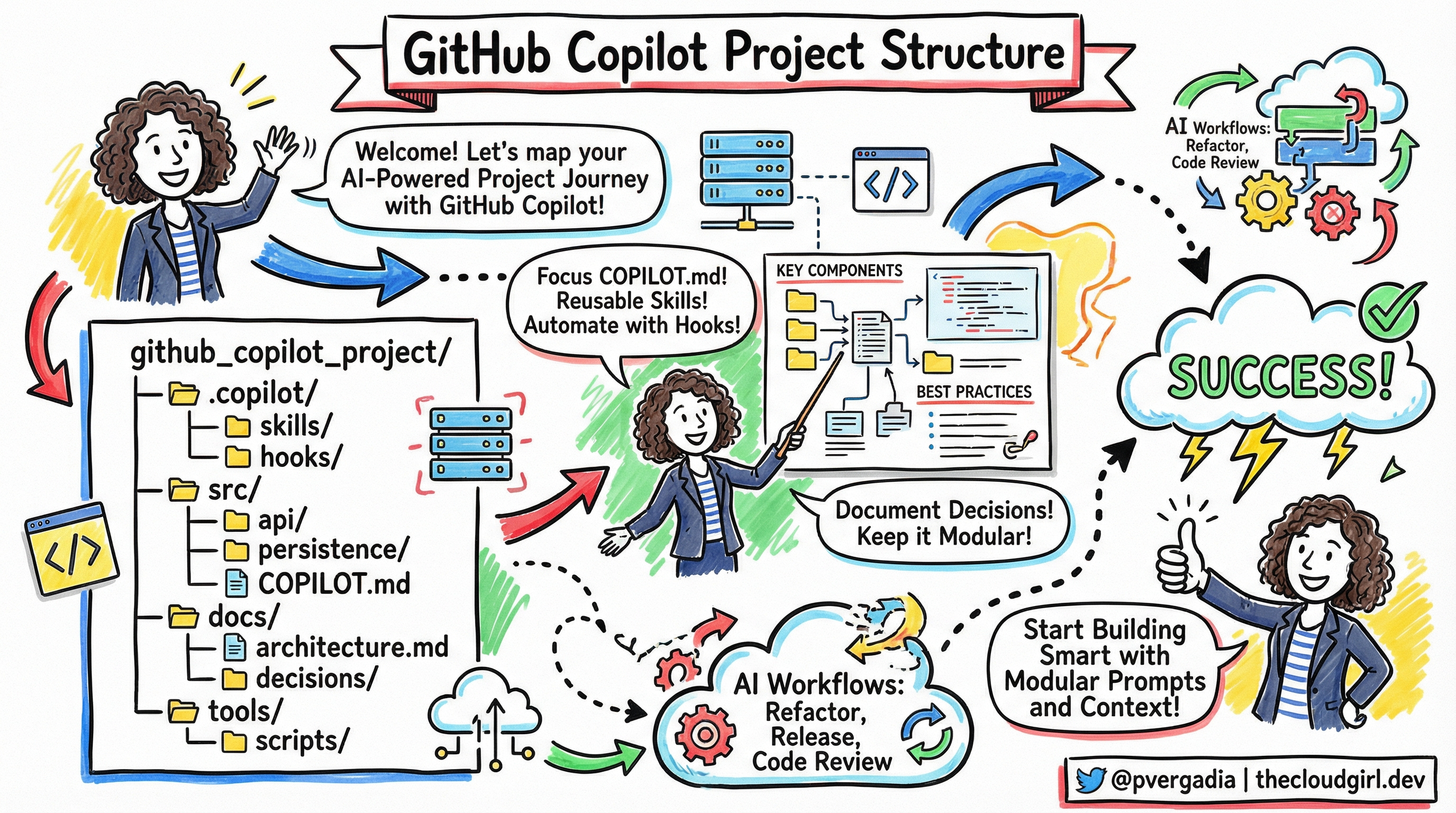
The GitHub Copilot Project Structure
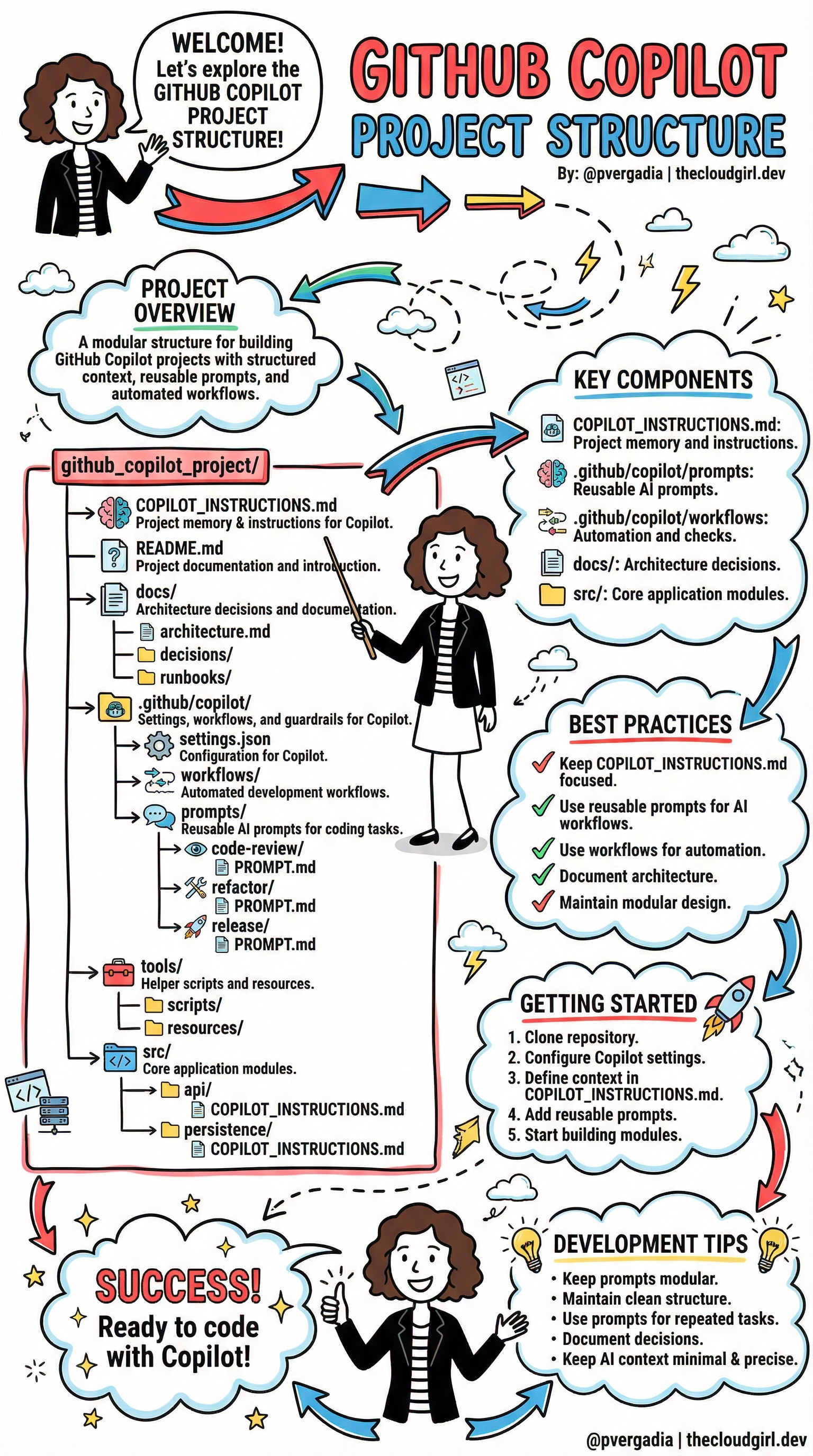
Think of your project as having two audiences now: your team and your AI. The structure that emerged from my late-night experimentation — and that’s been circulating in the developer community — is elegantly simple:
github_copilot_project/
├── COPILOT_INSTRUCTIONS.md        ← The AI's brain
├── README.md
├── docs/
│   ├── architecture.md
│   ├── decisions/
│   └── runbooks/
├── .github/copilot/
│   ├── settings.json
│   ├── workflows/
│   └── prompts/
│       ├── code-review/PROMPT.md
│       ├── refactor/PROMPT.md
│       └── release/PROMPT.md
├── tools/
│   ├── scripts/
│   └── resources/
└── src/
    ├── api/
    │   └── COPILOT_INSTRUCTIONS.md
    └── persistence/
        └── COPILOT_INSTRUCTIONS.md
Let’s unpack why each of these matters — and how they work together.
COPILOT_INSTRUCTIONS.md
This is the most important file in the entire setup. Consider it project memory — a letter you write to Copilot explaining who you are and how you work.
In one of my Python projects, the root COPILOT_INSTRUCTIONS.md looks something like this:
# Project Context for Copilot

## Tech Stack
- Python 3.11, FastAPI, SQLAlchemy 2.0
- PostgreSQL for persistence, Redis for caching
- All async handlers — never use synchronous DB calls

## Conventions
- Use snake_case for variables, PascalCase for classes
- Repository pattern for data access (see src/persistence/)
- Never import directly from third-party libs — use our wrappers in src/lib/

## Current Sprint Focus
- Refactoring authentication module
- Do NOT suggest changes to payment module (under compliance review)
That last bullet is the kind of thing Copilot can’t guess. Now it can.
The magic multiplies when you add module-level COPILOT_INSTRUCTIONS.md files inside subdirectories like src/api/ or src/persistence/. Each one narrows the context further: “In this folder, we handle database transactions. Always use the session factory. Always commit explicitly.”
Reusable Prompts: Stop Typing the Same Thing Twice
Inside .github/copilot/prompts/, you store your most valuable AI conversations in reusable form. Think of them as saved spells.
A code-review/PROMPT.md might read:
Review this code with attention to:
- Security vulnerabilities (especially injection risks)
- Adherence to our async patterns
- Missing error handling for network timeouts
- Any direct DB calls that bypass the repository layer
A refactor/PROMPT.md might include your team’s specific refactoring philosophy — maybe you prefer composition over inheritance, or you always extract config values to constants. You write it once. Copilot reads it every time.
In Python projects, this is especially powerful when combined with type hints. A well-crafted refactor prompt can instruct Copilot to add proper TypeVar annotations or modernize to match statements — exactly the way your codebase does it.
Workflows: Let the AI Handle the Boring Parts
Inside .github/copilot/workflows/, you define automated development workflows — think of them as mini-pipelines that Copilot can trigger or assist with.
Release workflows might prompt Copilot to: scan recent commits for breaking changes, draft a changelog entry in your preferred format, and flag any tests that were skipped. Code review workflows might automatically check that every new function has a docstring and type annotations.
For Python developers, this is where you can enforce your mypy and ruff standards before a human even looks at a pull request.
docs/: Where Decisions Live Forever
The docs/decisions/ folder is one of those “I wish I’d done this from day one” additions. Every significant technical choice — why you chose Pydantic over dataclasses, why you switched from Celery to asyncio queues, why that one module is structured weirdly — gets a decision record.
Copilot surfaces these when it’s working nearby. Suddenly, it’s not suggesting you switch back to the pattern you deliberately moved away from. It has the receipts.
tools/scripts/: Utility Where It Belongs
Helper scripts, code generators, migration tools — all neatly tucked into tools/. This keeps your src/ clean and gives Copilot a clear signal: “If you’re generating boilerplate or running utilities, look here.”
The AI Scope Creep
Here’s something that doesn’t get enough attention. Copilot — and AI tools broadly — have a natural tendency to expand scope. Ask it to fix a bug in your auth module and it might casually refactor three other files, add a dependency you didn’t ask for, and restructure a utility function “while it’s in the neighborhood.”
This isn’t a bug in Copilot. It’s a feature without guardrails.
Left unchecked, this behavior turns a 2-hour focused task into a sprawling 2-day review session where you’re not even sure what changed or why. The solution? Different people on your team need to contribute to the instructions — not just developers.
The Persona Model: Who Writes What
This is the insight that changed how my team thinks about COPILOT_INSTRUCTIONS.md. It’s not a developer artifact. It’s a team artifact — with distinct layers authored by distinct roles.
🎯 The Product Lead: Context and Boundaries
The product lead owns docs/product_context.md — a file that grounds Copilot in why the product exists and what it must never compromise. This is the highest-level guardrail.
# Product Context

## What We're Building
A B2B invoicing platform for SMBs in regulated industries (healthcare, legal).
Primary users: finance managers, not developers.

## Current Quarter Focus
- Sprint 14: Improving invoice generation speed
- OUT OF SCOPE this quarter: Payment gateway changes, new user roles, reporting module

## Non-Negotiables
- HIPAA-adjacent data handling — never log PII, never cache patient identifiers
- Invoice templates are customer-configurable — never hardcode formatting assumptions
- Accessibility: all UI must meet WCAG 2.1 AA — suggest compliant patterns only
When a developer opens the src/invoicing/ module, Copilot knows it’s in a HIPAA-sensitive zone — not because the developer remembered to mention it, but because the product lead wrote it down once.
🏛️ The Architect: Technical Guardrails
The architect owns docs/architecture_guardrails.md. This is where the big structural decisions live — the ones that took months of debate and shouldn’t be revisited every sprint because Copilot had a different idea.
# Architecture Guardrails

## Boundaries — Do Not Cross
- API layer (src/api/) must NEVER import directly from src/persistence/
  Always go through the service layer (src/services/)
- No synchronous I/O anywhere in src/api/ — we are fully async (FastAPI + asyncio)
- New external dependencies require an ADR in docs/decisions/ before code is written

## Approved Patterns
- Data validation: Pydantic v2 models only (not dataclasses, not TypedDict)
- Background tasks: Use existing Celery workers in src/workers/ — do NOT introduce asyncio.create_task for background work
- Database migrations: Alembic only — never ALTER TABLE in application code

## What We've Explicitly Rejected and Why
- GraphQL: Evaluated Q2 2024, rejected due to client simplicity (see docs/decisions/004-no-graphql.md)
- Redis as primary store: Too operationally complex for our team size
This is scope control in writing. When Copilot is working on a FastAPI route and considers importing the database session directly, the guardrails file says: no, go through the service layer. No debate needed.
👩💻 The Developer: Sprint Scope
Finally, developers own the module-level COPILOT_INSTRUCTIONS.md files — and crucially, they update them per sprint. This is the most granular and most frequently changing layer.
# src/invoicing/ — Copilot Instructions

## Sprint 14 Scope (ends Dec 6)
Working on: invoice_generator.py and pdf_renderer.py ONLY
Do NOT touch: template_engine.py (Sarah owns this, separate PR)
Do NOT refactor: anything in src/invoicing/legacy/ (deprecation scheduled for Q1)

## This Module's Rules
- All monetary values use Python's `Decimal` — never float
- PDF generation uses WeasyPrint — do not suggest switching to reportlab
- Every public function needs a docstring with an example

## Known Tech Debt (Don't Fix Yet)
- generate_invoice() has too many parameters — tracked in JIRA INV-204
- Caching layer is commented out intentionally pending load test results
That last section is gold. “Known Tech Debt — Don’t Fix Yet” is exactly the kind of tribal knowledge that causes AI tools to go rogue. Copilot sees messy code and wants to clean it. The developer’s instructions say: not now, not you, not without a ticket.
How It Flows Together
Picture the three layers as concentric circles:
Product Lead sets the outer boundary — what the product is, what’s out of scope this quarter, what must never be compromised
Architect defines the structural rules — patterns, boundaries between modules, approved libraries, rejected approaches
Developer narrows to the immediate — what files are in play this sprint, what’s off-limits even if it looks broken, what shortcuts are intentional
Copilot reads all three. By the time it’s suggesting code, it has the full picture: the why (product), the how we build (architecture), and the what right now (sprint scope).
A new developer joining the team gets the same benefit. They’re not just reading docs — they’re seeing the same guardrails that shape every AI suggestion they’ll encounter.
Getting Started: Five Steps to AI-Ready
The path from chaos to clarity is shorter than you think:
Clone or restructure your repository with the layout above
Product lead writes
docs/product_context.md— scope, non-negotiables, what’s off-limits this quarterArchitect writes
docs/architecture_guardrails.md— patterns, module boundaries, rejected approaches with reasonsDevelopers write module-level
COPILOT_INSTRUCTIONS.mdfiles — sprint scope, known debt to ignore, local rulesCapture reusable prompts in
.github/copilot/prompts/and watch every AI interaction get sharper
The Mindset Shift
What this structure really represents is a philosophy: AI context is infrastructure. We spend enormous time on CI/CD pipelines, test coverage, and code documentation — all to make the codebase legible and maintainable for future humans. It’s time to extend that same care to making it legible for AI.
Keep your COPILOT_INSTRUCTIONS.md focused, not encyclopedic. Update it when your architecture changes. Use reusable prompts for every repeated task. Document decisions, not just code. Maintain modularity — both in your code and in your AI context.
After restructuring three projects this way — and getting the whole team involved — my Wednesday nights look different. Copilot still gets things wrong sometimes. But now when I open a file in src/invoicing/, it knows it’s in a HIPAA-sensitive zone. When it’s working on a FastAPI route, it knows to go through the service layer. When a developer starts their sprint, they update 10 lines in a markdown file and suddenly the AI is scoped exactly to the task at hand.
That brilliant but clueless new hire? They’ve read the onboarding docs, the architecture decisions, and the sprint brief.
The real shift is this: AI context is a team responsibility, not a developer afterthought. Product leads guard the what. Architects guard the how. Developers guard the now. Together, they turn an enthusiastic, scope-expanding AI into a precisely targeted coding partner.
Start with your team. Assign the layers. Write it down once. Let Copilot do the rest.