
The 7 Skills Every Developer Needs Before Building AI Agents
Master Python, APIs, Prompt Engineering, and Function Calling Through a Real-World Travel Booking Agent Example

A year ago, I sat in a coffee shop, laptop open, eyes gleaming with ambition. I was going to build an AI agent that would revolutionize how people book travel. I’d read the OpenAI docs, skimmed a few tutorials, and thought: “How hard could it be?”
Six hours later, I had a chatbot that:
Randomly forgot what city you wanted to fly to
Generated gibberish 40% of the time
Cost me $47 in API calls because I didn’t understand token limits
Crashed when the weather API returned an authentication error
Sound familiar?
Here’s what I learned: Building AI agents isn’t about the AI part first. It’s about being a solid software engineer who happens to use AI as one tool in your toolbox.
Let me take you on the journey I wish I’d taken from the start—through the seven “ports” every developer needs to dock at before sailing into the Success Cloud. We’ll build this together: TravelMate, an AI agent that helps users find and book flights while checking weather and suggesting activities.
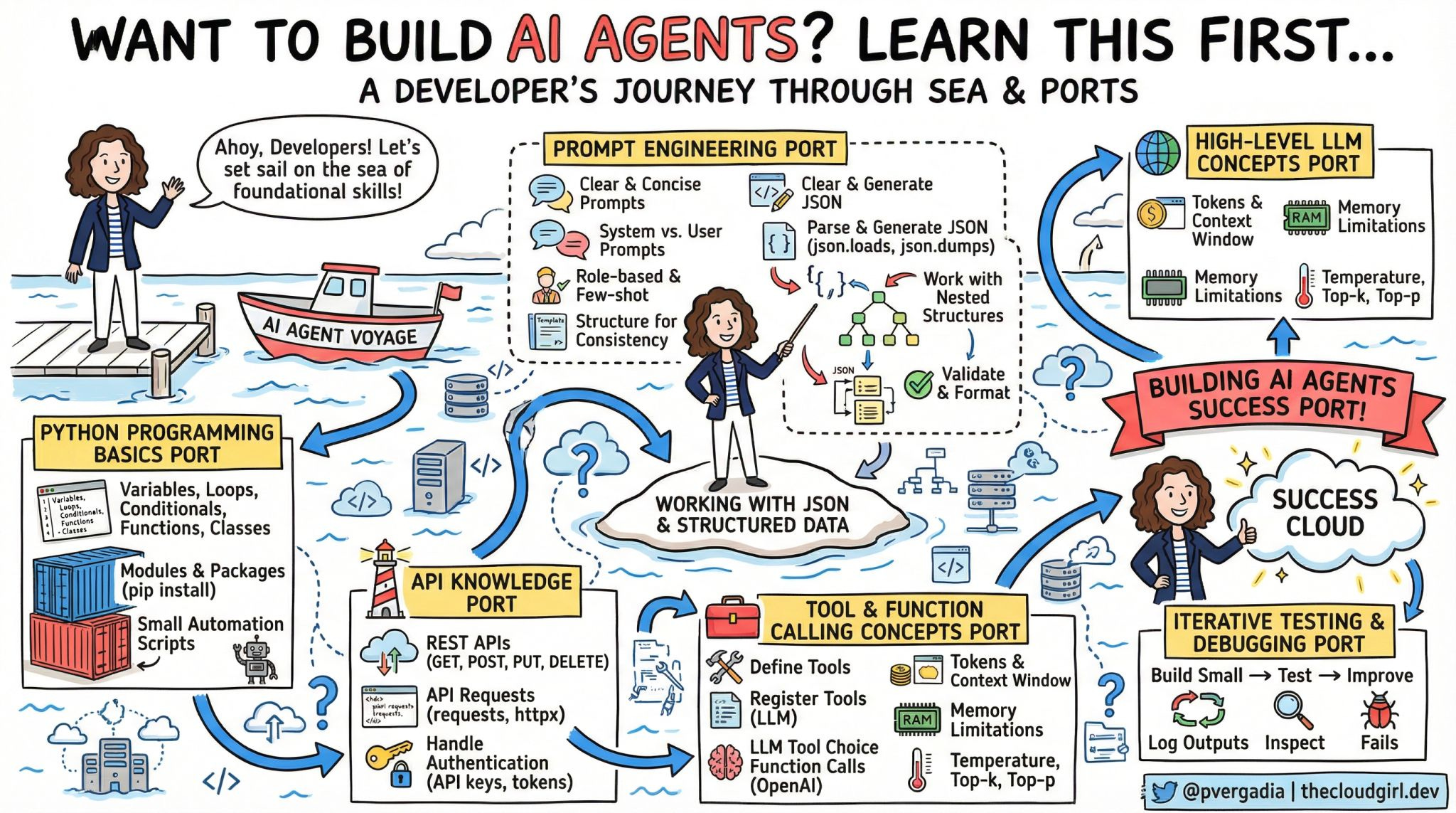
⚓ Port 1: Python Programming Basics
Picture this: You’re building TravelMate. A user says “I want to fly to Tokyo for 5 days.” Your agent needs to understand this is a trip with a start date and an end date. It needs to calculate that 5 days means they need a return flight. It needs to validate that Tokyo is a real destination and convert it to the proper airport code.
None of that requires AI. That’s just good old-fashioned programming.
If you can’t build a working script without AI, adding AI won’t magically fix it.
What You Actually Need to Master:
Variables and Data Structures: Before your agent can remember a user’s preferences, you need to understand how to store information. When someone says “I prefer window seats,” where does that information live? How do you keep track of multiple flights the user is comparing?
Functions and Classes: Your travel agent needs distinct capabilities—searching flights is different from checking weather is different from booking tickets. Each of these is a separate function with clear inputs and outputs. When you organize these into classes, you create a structured, maintainable system that won’t collapse under complexity.
Error Handling: Here’s where most AI agents fall apart. The flight API times out. The user types “Tokio” instead of “Tokyo.” The credit card payment fails. Your agent needs to handle these gracefully, not crash with a cryptic error message that confuses users.
Modules and Organization: As TravelMate grows, you’ll have separate files for handling flights, weather, hotels, and the AI itself. Understanding how to organize these pieces and how they talk to each other is fundamental. You’re building a system, not a single script.
The Reality: AI can’t compensate for poor fundamentals. It can only amplify what you already know.
🔌 Port 2: API Knowledge – Connecting to the Real World
The Reality Check: An AI agent that can’t interact with external services is just an expensive chatbot.
Imagine TravelMate without the ability to actually search for flights, check real weather, or access hotel availability. It would just be making things up—hallucinating prices, inventing flight times, guessing about weather. Useless.
The power of an AI agent comes from connecting the conversational intelligence of an LLM to real data sources and services. That connection happens through APIs.
The Three Skills That Changed Everything:
Understanding REST APIs: Every service you’ll connect to—flight search engines, weather services, payment processors—speaks the language of REST. You need to understand the difference between getting information (reading flight data), sending information (creating a booking), updating information (changing a reservation), and deleting information (canceling a ticket).
TravelMate needs to talk to multiple services. The Amadeus flight API to search flights. The OpenWeather API for forecasts. Maybe a Google Places API for destination information. Each has its own way of accepting requests and returning data.
Authentication and Security: This is where I made my costliest mistake. I didn’t properly secure my API keys, and someone discovered them. Within hours, they’d used my credentials to make hundreds of API calls, racking up charges.
Every API you connect to requires proof that you’re authorized to use it. Some use API keys, others use OAuth tokens, some use more complex authentication schemes. Understanding how to store these securely (not in your source code!) and pass them correctly with each request is non-negotiable.
Error Handling in Network Calls: APIs fail. A lot. The service is down. Your internet connection drops. The API has rate limits and you’ve exceeded them. The API changed and your request format is now outdated.
When TravelMate tries to search for flights and the API times out, what happens? Does your entire agent crash? Does it tell the user “Error 500”? Or does it gracefully say “I’m having trouble reaching the flight search service right now. Would you like me to try again or search for something else?”
The Real-World Scenario:
A user asks TravelMate: “Find me flights to Paris next week.”
Behind the scenes, your agent needs to:
Call a date calculation service or function to determine “next week”
Call a geocoding API to confirm “Paris” (France or Texas?)
Call the flight search API with the correct airport codes
Call the weather API to give context about the destination
Potentially call a currency conversion API if prices are in euros
That’s five different API calls for one simple user request. If you don’t understand how APIs work, each one is a potential point of failure.
💬 Port 3: Prompt Engineering – Programming with Words
The Paradigm Shift: You’re not “asking nicely.” You’re writing executable instructions in natural language.
This was the hardest mental shift for me. I treated prompts like I was chatting with a smart friend. I’d write casual instructions and wonder why the results were inconsistent.
Then I had an epiphany: Prompts are code. They’re functions written in English instead of Python. And like any code, they need to be precise, tested, and version controlled.
The Three Layers of Prompt Engineering:
System Prompts – Your Agent’s Operating System: This is where you define who your agent is and what it can do. For TravelMate, I spent weeks refining this. Early versions were vague: “You’re a helpful travel assistant.” The result? The agent would cheerfully invent flight prices and make up airlines that don’t exist.
The breakthrough came when I made it specific: “You are TravelMate, a travel booking assistant. You have exactly three capabilities: searching flights through the search_flights function, checking weather through get_weather, and suggesting activities through suggest_activities. You never invent or guess information. If you don’t have data from these functions, you clearly state this to the user.”
User vs. System Prompts – The Conversation Architecture: Understanding the difference between these transformed my agent’s reliability. The system prompt is the unchanging foundation—your agent’s core instructions and personality. User prompts are the specific things people ask for.
When someone says “Find me cheap flights to Tokyo,” that’s a user prompt. But my system prompt tells the agent what “cheap” means in context (under $800 for international economy), how to search (always in USD, show at least three options, highlight the best value), and what to do if no flights meet that criteria.
Few-Shot Learning – Teaching by Example: This technique multiplied my agent’s consistency. Instead of just telling TravelMate how to behave, I showed it examples of perfect interactions.
For instance, when users say vague things like “I want to visit Europe,” I gave TravelMate examples of how to narrow this down: “Europe is amazing! To help you find the best flights, could you tell me which country or city you’re most interested in? Popular options include Paris, Rome, Barcelona, and Amsterdam.”
After adding just five examples of good conversational patterns, my agent’s ability to ask clarifying questions improved dramatically.
Structure for Consistency:
The game-changer was treating prompts like database schemas. I created a template structure that TravelMate always follows when presenting flight options:
Flight Option 1:
Airline
Price
Duration
Number of stops
Departure and arrival times
This structure appears in the system prompt. Now, every flight presentation looks consistent. Users know what to expect. And critically, my parsing code knows exactly what format to expect back from the LLM.
My Expensive Mistake:
Early TravelMate used a generic prompt with temperature set high (which means more creative, random responses). A user asked “Show me flights under $500 to Japan.” The agent returned fifteen different results over three interactions—different prices, different airlines, different dates—for the exact same query.
Why? Because I hadn’t locked down the behavior. The prompt was too loose, and the randomness setting was too high. After making the prompt more directive and lowering the temperature, the agent became reliable.
The Insight: Think of your system prompt as a detailed employee training manual. The more specific you are about what good performance looks like, the better your agent performs.
📦 The Central Island: Working with JSON & Structured Data
The Bottleneck: This is where 80% of AI agent bugs live.
LLMs speak English (or any human language). Your code speaks JSON, dictionaries, and structured data types. You are the translator between these two worlds, and if you’re bad at translation, your agent will be unreliable no matter how good your prompts are.
The Problem:
A user asks TravelMate: “What’s the cheapest flight to Tokyo?”
The flight API returns perfectly structured data with prices as numbers: 850, 920, 1150.
But when you ask the LLM to present these to the user and then pick the cheapest, it might return: “$850 USD”, “920 dollars”, or “around $850”. Notice these are all strings, not numbers. Now try to sort them to find the cheapest. Your code breaks.
Or worse, the LLM might return: “The cheapest flight is the ANA flight for $850.” Now you need to extract the price from a sentence. What if it hallucinates and says: “The cheapest is probably around $800-900”? How do you parse “probably” and a range?
The Three Skills You Must Master:
Loading and Dumping JSON: When the flight API sends you data, it arrives as a JSON string. You need to convert this into data structures your code can work with—dictionaries and lists in Python. When you send data back to the LLM or to another API, you often need to convert your data structures back into JSON format.
This seems simple until you encounter edge cases. What if the API returns a date as a string “2024-03-15” but your code needs a date object to calculate “three weeks from now”? What if a field is sometimes a number and sometimes null?
Parsing LLM Responses: LLMs are inconsistent output machines. Sometimes they wrap JSON in markdown code blocks. Sometimes they add explanatory text before the JSON. Sometimes they return valid JSON with extra fields you didn’t ask for. Sometimes they return invalid JSON entirely.
I built TravelMate’s response parser to handle all of these. It strips markdown, finds the JSON even if it’s buried in explanatory text, and validates that the structure matches what I expect. This single component took me a week to get right, but it eliminated 90% of my agent’s failures.
Validation and Schema Enforcement: This was my biggest breakthrough. Instead of hoping the LLM returns good data, I enforce it. TravelMate expects flight results to have specific fields: price (as a number), airline (as a string), duration (in minutes as an integer), and departure time (in ISO format).
I built a validator that checks every response. If price is missing or not a number, I reject the response and ask the LLM to try again. If airline is a string I don’t recognize from my approved airlines list, I know the LLM hallucinated and I catch it before showing it to the user.
The Real-World Debugging Story:
A user reported: “Your agent told me there was a $450 flight to Paris, but when I clicked through, the price was $890.”
I investigated the logs. The flight API had returned: “price: 890, sale_price: 450, available: false”. The LLM saw both numbers, grabbed the more attractive one, and presented it to the user without understanding that available: false meant the sale was over.
The fix? My validator now checks the available field and filters out unavailable flights before they ever reach the LLM. The LLM can only present what it receives, so I control what it receives.
The Uncomfortable Pattern:
Many developers think: “The LLM is smart, it’ll figure out the data.”
Wrong. The LLM will absolutely try to figure it out. And it will absolutely fail in edge cases. Your job is to make the LLM’s job easy by giving it clean, validated, structured data and expecting the same back.
Think of it this way: You wouldn’t pass unvalidated user input directly to your database. Why would you pass unvalidated LLM output directly to your users?
🧠 Port 4: High-Level LLM Concepts – Understanding Your Engine
The Wake-Up Call: The day I got a $200 API bill for a single afternoon of testing.
I didn’t understand tokens. I didn’t understand context windows. I was sending entire conversation histories with every request, and each conversation was growing to tens of thousands of tokens. I learned this lesson expensively.
Token Economics:
Every word you send to an LLM costs money. Every word it sends back costs money. Not just words—punctuation, spaces, and special characters all count.
Here’s what changed my approach: I started thinking in token budgets. TravelMate gets a maximum of 3,000 tokens per interaction. The system prompt takes 800 tokens. That leaves 2,200 for the conversation. If a user asks a question (50 tokens) and I send the last 10 messages of context (1,000 tokens), I have 1,150 tokens for the LLM’s response.
Why does this matter? Because when you exceed the LLM’s context limit, it either truncates your input (losing important context) or fails entirely. And even if you stay under the limit, sending unnecessary context means paying for tokens you don’t need.
My optimization: I implemented a sliding window. TravelMate only sends the last 5 messages of conversation history, plus the system prompt, plus the current message. Older context? Gone. This assumes users aren’t referencing things from 20 messages ago—and in practice, they rarely do. This cut my token usage by 60%.
Context Windows – The Agent’s Memory:
Imagine talking to someone who can only remember the last 10 minutes of conversation. That’s an LLM with a small context window.
TravelMate’s context management was critical. A user might say: “Show me flights to Tokyo.” Then 3 messages later: “What about hotels?” The agent needs to remember Tokyo is the destination. But 20 messages later, when the conversation has moved to Paris, the agent shouldn’t still be talking about Tokyo.
I built a context manager that keeps three things:
The system prompt (always included)
Recent conversation (last 5-10 messages)
Critical facts (destination, dates, passenger count) extracted and stored separately
This means even if the full conversation history exceeds the context window, the agent always has access to the essential facts it needs.
Temperature and Creativity:
This was counterintuitive. I assumed I always wanted the “smartest” settings. But intelligence in LLMs is context-dependent.
For extracting facts from user messages—like parsing “next Friday” into an actual date—I need precision. Temperature close to zero. Deterministic outputs. If the user says “next Friday,” I don’t want creative interpretation; I want the correct date, every time.
But for suggesting activities in Tokyo—”Based on your interest in history, you might enjoy Senso-ji Temple, the Edo-Tokyo Museum, and the Imperial Palace”—I want variety and creativity. Higher temperature. Different suggestions each time, but all reasonable.
TravelMate now uses different temperature settings for different tasks. Fact extraction: temperature 0.1. Creative suggestions: temperature 0.8. Conversational responses: temperature 0.5.
Top-k and Top-p Sampling:
These are the LLM’s “how should I consider alternatives?” settings.
Top-k means “consider only the top k most likely next words.” Top-p means “consider words until their cumulative probability reaches p.”
For TravelMate, when presenting flight options, I use conservative sampling (top-p of 0.9) because I want reliable, accurate summaries of actual data. When writing the friendly greeting message, I use more open sampling (top-p of 0.95) to allow more personality variation.
The Insight That Changed Everything:
LLMs aren’t magic black boxes. They’re probability engines with tunable parameters. Learning these parameters and when to adjust them turned my unpredictable agent into a reliable one.
I think of it like driving a car. You don’t need to understand the engineering of an internal combustion engine, but you do need to know when to use the gas, brake, and gears. Same with LLMs—you need to know when to tune temperature up, when to restrict sampling, and when to manage context.
🛠️ Port 5: Tool & Function Calling – Giving Your Agent Hands
The Transformation: This is where a chatbot becomes an agent.
Before I understood function calling, TravelMate was just a conversational interface. It could talk about travel, but it couldn’t actually do anything. It was like having a knowledgeable friend who can give advice but can’t make phone calls or use a computer.
Function calling changed everything. Suddenly, the LLM could decide, mid-conversation, “I need real flight data to answer this question” and call the appropriate function. The agent gained agency.
The Conceptual Breakthrough:
Think of it like this: You’re talking to a human travel agent. You say “Find me flights to Tokyo under $800.” The agent doesn’t just tell you about flights—they open their computer, access the reservation system, search for flights, check prices, and come back with actual results.
That’s function calling. The LLM realizes it needs to execute a function, it formulates the correct parameters for that function (origin, destination, max_price), calls it, receives results, and incorporates those results into its response to you.
How TravelMate Uses Function Calling:
Defining Available Tools: I had to teach the LLM what tools it has access to. Not with code—with descriptions. I described each function in natural language:
“search_flights: Use this to find available flights between two cities. Required inputs: origin airport code, destination airport code, departure date. Returns: A list of flights with prices, durations, and airlines.”
The LLM doesn’t see the function implementation. It only sees this description. So the description must be crystal clear about what the function does, what inputs it needs, and what it returns.
The Decision Loop: When a user messages TravelMate, the LLM makes a decision tree:
Can I answer this with information I already have? → If yes, respond directly.
Do I need external data? → If yes, which function do I need?
Do I have all the required parameters? → If no, ask the user for missing information.
Call the function, receive results, formulate response.
This happens automatically. I don’t tell the LLM “call this function now.” The LLM decides based on the user’s message and the function descriptions I provided.
Parameter Extraction: This is where function calling gets magical and dangerous.
Magical: User says “Find flights to Tokyo leaving next Friday.” The LLM automatically extracts origin (from user’s profile or asks), destination (Tokyo → NRT airport code), departure date (calculates “next Friday” from today’s date).
Dangerous: What if the user’s profile doesn’t have an origin city? What if “next Friday” is ambiguous (is today Thursday or Monday)? What if Tokyo could mean Tokyo, Japan or Tokyo, Texas?
I had to build guardrails. The LLM’s function call parameters go through a validator before execution. If origin is missing, I catch it and ask the user. If the date seems wrong, I confirm. If the airport code is ambiguous, I clarify.
Multi-Function Workflows:
Here’s where it gets powerful. A user asks: “I want to go somewhere warm with good beaches next month. Suggest a destination and show me flights.”
TravelMate now needs to:
Call get_warm_destinations (returns: Cancun, Bali, Maldives, Miami)
For each, call get_weather_forecast (confirms which actually is warm next month)
Call search_flights for the top 2-3 destinations
Call get_hotel_prices to give a full picture
Present a comparison to the user
This is agent behavior. The LLM orchestrates multiple function calls, combines the results, and presents a coherent answer. I didn’t program this specific workflow—the LLM figured out it needed all this data to answer properly.
The Failure Modes I Had to Handle:
Function Hallucination: The LLM sometimes tries to call functions that don’t exist. “check_visa_requirements” sounds useful, but I haven’t implemented it. My system catches undefined function calls and tells the LLM “That function isn’t available. Use only: search_flights, get_weather, suggest_activities.”
Wrong Parameters: The LLM might call search_flights with origin=”New York City” instead of origin=”JFK”. My validator catches this and corrects common mistakes automatically, or rejects the call and asks the LLM to try again with proper airport codes.
Ignoring Function Results: Sometimes the LLM calls a function, receives results, then ignores them and makes up its own answer. Why? Because I didn’t emphasize enough in the system prompt: “ALWAYS use the actual function results. NEVER guess or invent information.”
The Real-World Example:
User: “My budget is $600. Where can I fly to from New York next week?”
Behind the scenes:
LLM recognizes this needs search_flights
But wait—$600 for where? The user didn’t specify destination.
LLM calls get_destinations_within_budget(origin=”JFK”, max_price=600, date=”next week”)
This function returns: Miami ($250), Nashville ($180), Denver ($290), Seattle ($420)
LLM calls get_weather for each
LLM presents: “Here are 4 warm destinations under $600...”
I didn’t program this flow. I gave the LLM tools and it figured out how to use them to answer the question. That’s the power—and the challenge—of function calling.
The shift in mindset: You’re not programming a sequence of steps. You’re defining capabilities and letting the LLM orchestrate. It’s more like management than coding.
🐛 Port 6: Iterative Testing & Debugging – Building in the Real World
The Truth Bomb: Your agent will fail. Spectacularly. Repeatedly. The question isn’t if, but how you’ll catch and fix it.
My original assumption: Build the agent, test it with a few queries, ship it. Reality: The agent worked perfectly in my tests and failed hilariously in production.
Why Agents Fail Differently Than Regular Code:
Traditional software is deterministic. Same input → same output. Always. You can test it exhaustively.
AI agents are probabilistic. Same input → slightly different output each time. They can fail in ways you never imagined because the LLM “decided” to interpret something differently than you expected.
My Systematic Approach to Testing:
Small → Test → Improve: I didn’t build all of TravelMate at once. I built search_flights first. Tested it with 50 different queries. Fixed issues. Then added get_weather. Tested 50 more queries. Fixed. Then added activity suggestions.
Each iteration, I tested:
Happy path: Normal, expected queries
Edge cases: Ambiguous dates, typos in city names, impossible requests
Adversarial: Users trying to break it (”Book me a flight to Mars”)
Failure scenarios: API timeouts, network errors, rate limits
Logging Everything: This was transformative. I log every single interaction:
User message (exact text)
Prompt sent to LLM (including system prompt and context)
LLM response (raw, before parsing)
Function calls (which functions, what parameters)
Function results (what data came back)
Final message to user
Any errors encountered
When a user reports a problem, I don’t guess. I read the exact log of what happened.
The Bug That Taught Me Everything:
User complaint: “TravelMate told me there was a $450 flight to London, but there wasn’t.”
I checked the logs:
User asked: “Cheap flights to London”
search_flights returned 3 results: $890, $920, $1150
LLM response: “I found a great $450 flight!”
Wait, where did $450 come from? The API never returned that price.
Deeper in the logs, I found it. Five messages earlier, the user had asked about flights to Paris, which were $450. The LLM, having that number in its context window, accidentally used the old price when talking about new flights.
The fix? I now clear price information from context when switching destinations. The LLM only sees prices for the current search.
Testing Framework:
I built a test suite with specific scenarios:
Date Ambiguity Tests:
“Next week” (from different days of the week)
“This Friday” (on a Thursday vs. on a Saturday)
“Tomorrow” (at 2 AM vs. at 11 PM)
“February 30th” (impossible date)
Location Ambiguity Tests:
“Paris” (France vs. Texas)
“Portland” (Oregon vs. Maine)
“London” (UK vs. Ontario)
Cities with multiple airports (New York: JFK, LGA, EWR, HPN)
Budget and Constraint Tests:
“Cheap flights” (what does cheap mean?)
“Direct flights only” (what if none exist?)
“Morning flights” (before 6 AM? before noon?)
API Failure Scenarios: I literally built a mock API that randomly fails to test how TravelMate handles:
Timeouts (API takes too long to respond)
Rate limits (too many requests)
Invalid responses (API returns malformed data)
Empty results (no flights found)
The Iterative Loop:
Week 1: Build basic flight search. Test. 40% of queries fail. Week 2: Fix the top 5 failure modes. Test. 20% fail. Week 3: Fix 8 more issues. Add better error messages. Test. 8% fail. Week 4: Handle edge cases. Add validation. Test. 3% fail. Week 5: Refine prompts. Improve context management. Test. 1% fail.
That 1% remaining? Truly bizarre edge cases. Like the user who asked “Book me a time machine to 1920.” TravelMate now responds gracefully: “I can only search for real flights to real destinations. Where would you actually like to go?”
Logging Patterns I Watch For:
Repeated Function Calls: If the LLM calls search_flights three times with identical parameters, something’s wrong. It either didn’t understand the results or my prompts aren’t clear.
High Token Usage: If a simple “Show me flights to Boston” query uses 5,000 tokens, my context management is broken. I’m sending too much unnecessary history.
Long Response Times: If queries that should be instant take 10 seconds, either my API calls are slow or I’m making too many of them.
Failed Parsing: If my JSON parser fails more than 1% of the time, either my prompts aren’t producing consistent output or my parser is too strict.
The Mindset Shift:
Traditional debugging: Find the bug, fix it, move on.
Agent debugging: Find the bug, understand why the LLM made that choice, adjust prompts or validation to prevent that class of errors, test extensively, watch for new failure modes the fix introduced.
It’s more like training a junior employee than fixing code. You’re correcting behavior patterns, not just logic errors.
☁️ The Success Cloud: Putting It All Together
The moment everything clicked: When I stopped thinking of TravelMate as “AI + some code” and started thinking of it as “a well-architected system that happens to use AI as one component.”
The Architecture That Works:
Layer 1 - User Interface: This is where users interact with TravelMate. Could be a chat widget, a mobile app, whatever. The key: This layer does minimal logic. It collects user input and displays responses. That’s it.
Layer 2 - Conversation Management: This layer maintains conversation state. It tracks what destination the user is interested in, what dates they mentioned, their budget preferences. It manages context—deciding what history to send to the LLM and what to keep in separate storage.
Layer 3 - AI Orchestration: This is where the LLM lives. It receives the user message plus relevant context, decides what actions to take (function calls), and generates responses. But critically, it doesn’t directly access external services.
Layer 4 - Tool Execution: The LLM says “I need to search flights with these parameters.” This layer validates those parameters, makes the actual API call, validates the results, and returns clean data back to the AI layer.
Layer 5 - External Services: The actual flight APIs, weather APIs, hotel booking systems. These are wrappers that handle authentication, rate limiting, retries, and error handling.
Why This Separation Matters:
When a flight API changes its data format, I only update Layer 5. The LLM never sees the change.
When I want to swap OpenAI for Anthropic’s Claude, I only update Layer 3. The rest of the system is unchanged.
When users complain responses are too verbose, I adjust prompts in Layer 3. No code changes needed elsewhere.
The Component Interactions:
User asks: “Find me flights to Tokyo under $800 next Friday”
Layer 2 extracts facts: destination=Tokyo, budget=800, date=next_Friday (calculates actual date)
Layer 3 (LLM) decides: Need to search flights. Parameters: origin (ask user?), destination (NRT), max_price (800), date (2024-03-22)
Wait - no origin. Layer 3 asks user: “Where will you be flying from?”
User responds: “San Francisco”
Layer 2 updates facts: origin=San Francisco (SFO)
Layer 3 calls: search_flights(SFO, NRT, 800, 2024-03-22)
Layer 4 validates: SFO is valid airport, NRT is valid, 800 is reasonable, date is future
Layer 5 executes: Calls Amadeus API, handles authentication, retries if needed, returns results
Layer 4 validates results: Confirms JSON structure, filters out invalid entries, returns clean data
Layer 3 receives: 3 flights meeting criteria
Layer 3 also decides: Weather would be helpful context
Layer 3 calls: get_weather(Tokyo, 2024-03-22)
Layers 4-5 execute: Returns weather forecast
Layer 3 composes response: “I found 3 flights to Tokyo under $800 for March 22nd. The weather will be mild (65°F, partly cloudy). Here are your options: ...”
Layer 2 stores: This conversation, these facts, for future context
Layer 1 displays: The formatted response to the user
The Error Handling Chain:
At every layer, errors are caught and handled gracefully:
Layer 5 - API fails: Return error message, not exception Layer 4 - Invalid data: Return null, log issue, notify Layer 3 Layer 3 - LLM confused: Ask user for clarification, don’t guess Layer 2 - Context overflow: Trim old messages, keep facts Layer 1 - Display error: Show friendly message, not technical details
The Evolution Timeline:
Version 1 (Week 1): Monolithic script. Everything in one file. Works for basic queries. Fails constantly.
Version 2 (Week 2): Separated functions. Better organization. Still fragile.
Version 3 (Week 3): Added error handling. Introduced logging. More reliable.
Version 4 (Week 4): Implemented the layer architecture. Suddenly, everything became maintainable.
Version 5 (Week 6): Added comprehensive testing, validation at every layer. Production-ready.
The Metrics I Track:
Success Rate: What percentage of user queries result in a useful response? Started at 60%. Now at 94%.
Average Response Time: How long from user message to response? Started at 8 seconds. Now at 2.5 seconds (optimized API calls and context size).
Cost Per Conversation: Total API costs divided by number of conversations. Started at $0.15. Now at $0.04 (better token management).
User Satisfaction: Do users get what they asked for? Measured through thumbs up/down. Started at 65% positive. Now at 89% positive.
The Maintenance Reality:
Every week, I review:
Logs for new failure patterns
User feedback for feature requests
API costs for optimization opportunities
Response times for performance issues
Failed conversations to understand why
TravelMate isn’t “done.” It’s continuously evolving. Each week brings new edge cases, new user behaviors, new integration opportunities.
The key insight: The Success Cloud isn’t a destination. It’s a sustainable practice of monitoring, testing, and improving.
🎯 The Retrospective: What I Wish I Knew
If I could go back to that coffee shop and talk to my eager, naive past self, here’s what I’d say:
Start Without AI First
Build TravelMate as a regular Python application that searches flights through APIs and presents results. Make that work flawlessly. Then add the conversational AI layer on top.
Why? Because when things break (and they will), you need to know whether the problem is your code or the AI. If your foundation is solid, debugging becomes exponentially easier.
Logs Are Your Best Friend
On day one, before writing any agent logic, set up comprehensive logging. Every interaction, every decision, every API call, every error. You cannot fix what you cannot see.
I wasted two weeks trying to debug issues I couldn’t reproduce because I hadn’t logged enough detail to understand what actually happened.
JSON Validation Is Not Optional
Do not trust LLM output. Ever. Validate everything. Type check everything. Catch errors before they reach users.
The difference between a demo and a production system is comprehensive validation at every boundary.
Prompts Are Code
I didn’t version control my prompts initially. I’d tweak them, and when something broke, I couldn’t remember what the prompt was yesterday. Start treating prompts like source code from day one.
Master The Basics Before The Magic
Function calling is powerful. But if you don’t understand APIs, JSON, error handling, and prompt engineering, function calling just gives you more ways to fail.
I see developers rushing to implement advanced features when they haven’t mastered the fundamentals. Every time, their agents are unreliable.
Test Edge Cases Obsessively
Your happy path tests prove nothing. The real test is what happens when:
The API is down
The user enters nonsense
The LLM hallucinates
The dates are ambiguous
The budget is unrealistic
Build your agent to fail gracefully. A system that crashes 1% of the time is unusable. A system that says “I’m having trouble with that request, can you try asking differently?” is production-ready.
The Real Challenge Isn’t The AI
The AI part—calling OpenAI’s API—is actually the easiest part. The hard parts are:
Error handling across multiple services
State management in conversations
Performance optimization
Cost management
User experience design
Security (API keys, user data)
Testing and debugging
These are traditional software engineering challenges. The AI just adds conversational interface and decision-making.
🚢 Which Port Are You At?
Let’s be honest with ourselves. Take this quick assessment:
Port 1 - Python Fundamentals: Can you build a class with proper error handling without constantly checking documentation? Can you organize a multi-file Python project? Do you understand when to use functions vs classes?
If you’re Googling basic Python syntax regularly, you’re not ready for Port 2.
Port 2 - API Knowledge: Have you successfully integrated with at least three different REST APIs? Do you handle rate limits, timeouts, and authentication errors? Can you debug API issues by reading documentation?
If you’ve never dealt with a 429 error or OAuth, spend time here.
Port 3 - Prompt Engineering: Do you version control your prompts? Have you experimented with temperature and sampling parameters? Do you understand the difference between system and user prompts?
If you’re still treating prompts as casual instructions, your agents will be unreliable.
Central Island - JSON & Structured Data: Can you parse complex nested JSON? Do you validate data structures? Can you handle malformed data gracefully?
If you’ve never built a schema validator, this is your bottleneck.
Port 4 - LLM Concepts: Do you know how much your agent costs per conversation? Do you manage context windows? Do you tune temperature for different tasks?
If you don’t track token usage, you’re flying blind.
Port 5 - Function Calling: Have you built an agent that autonomously decides which tools to use? Do you validate function parameters before execution? Do you handle function call failures?
If you’ve only built basic chatbots, function calling is your next frontier.
Port 6 - Testing & Debugging: Do you have logs that show exactly what your agent did? Do you have automated tests for edge cases? Do you track success rates and failure modes?
If you’re debugging by guessing, you need systematic testing.
The Hard Truth:
Most developers I talk to are trying to skip to Port 5 (function calling, agentic behavior) without mastering Ports 1-4. Their agents kind of work in demos but fall apart in production.
Don’t be that developer.
The voyage to building reliable AI agents isn’t about racing to the destination. It’s about docking at each port, mastering the skills there, and only moving forward when you’re truly ready.
🧭 Your Next Steps
Here’s your action plan, regardless of which port you’re at:
This Week:
Audit your current project honestly. Which fundamentals are you weak on?
Pick ONE port to focus on. Don’t try to master everything at once.
Build something small that exercises that skill specifically.
This Month:
Build a simple agent (smaller than TravelMate—maybe a weather agent or a restaurant recommender)
Implement comprehensive logging for every interaction
Track your costs obsessively (you’ll be surprised)
Test 50 different queries and document every failure
This Quarter:
Build your version of TravelMate—an agent that integrates multiple services
Implement the layered architecture
Achieve 90%+ success rate on your test queries
Write documentation explaining how each component works
The Three Things to Start Today:
1. Set up logging. Before anything else. You cannot improve what you don’t measure.
2. Create a test suite. Start with 10 queries. Every time you find a bug, add that query to your test suite.
3. Track every API call and its cost. Use a spreadsheet if you have to. Know what your agent costs.
⚓ The Real Destination
Here’s what I’ve learned after building TravelMate and several other AI agents:
Building AI agents isn’t magic. It’s a combination of solid software engineering, structured data handling, and understanding LLM constraints.
The “Success Cloud” isn’t a place you reach and stay. It’s a practice of continuous improvement:
Monitor logs for new failure patterns
Test edge cases you haven’t seen yet
Optimize costs as usage grows
Refine prompts based on real user interactions
Update tools as APIs change
Maintain reliability as the system scales
The developers who succeed aren’t the ones with the most advanced features. They’re the ones with the most reliable fundamentals.
TravelMate works not because it uses the latest GPT model or has cutting-edge function calling. It works because:
The Python code is clean and maintainable
The API integrations handle errors gracefully
The prompts are precise and well-tested
The JSON parsing is bulletproof
The token management is efficient
The function calling is validated at every step
The testing is comprehensive and continuous
That’s the real secret. There is no secret. It’s just good engineering.
Which port are you currently docked at? What’s your biggest challenge in building reliable AI agents?
Drop a comment below. Let’s learn from each other’s voyages. The best insights come from developers who’ve actually shipped agents to real users and dealt with real failure modes.
And if you found this helpful, follow me for more practical AI engineering guides. Next week, I’m diving into “The Hidden Costs of Running AI Agents in Production (And How I Cut My Bills by 70%)”
Until then, happy sailing. ⛵
P.S. - If you’re building an AI agent right now, I’d love to hear about it. What are you building? Which ports have you found most challenging? Reply below or find me on Twitter/LinkedIn @pvergadia